
Description
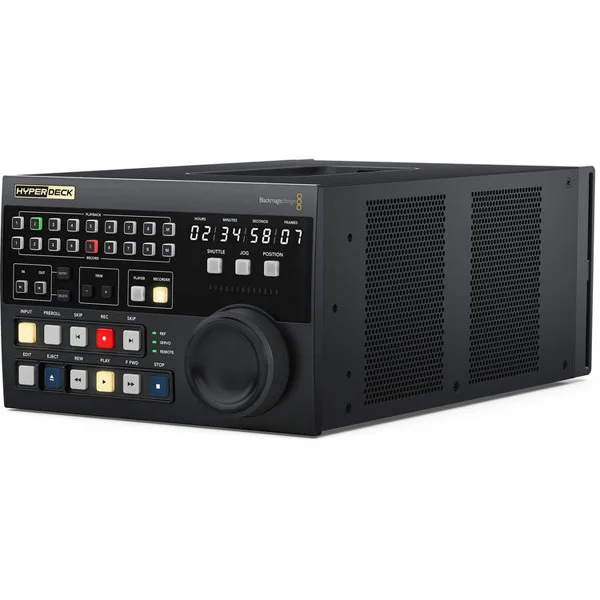
The HyperDeck Extreme Control offers traditional broadcast recorder controls and built-in editing functions to automate the processing of older videotapes. Combined with the HyperDeck Extreme, it provides a professional yet user-friendly recording solution. It features transport controls, timecode, recorder status, and a large jog wheel with an electronic clutch for jog, shuttle, and position modes. You can control up to eight different recorders via the RS-422 standard, ensuring compatibility with virtually any type of recorder! Editing between different video standards is even possible. You can up-convert old interlaced 4:3 SD originals to 1080p 16:9 HD using a Teranex Express converter.
Automated mounting between the tape and the HyperDeck
The built-in editing functions allow you to perform recorder-to-recorder editing. Just like a traditional recorder, the controller can operate both the HyperDeck’s recorder and the legacy broadcast recorder from the front panel. This allows you to edit old video tapes. Simply press the play button, enter the in and out points on the tape, select the recorder, and then press Edit. The HyperDeck Extreme Control will position and play the broadcast recorder while simultaneously recording to the HyperDeck. Most streaming services require 1080p24 originals. To meet these requirements, you can simply add a Teranex Express converter to deinterlace, up-convert, convert the aspect ratio, and remove pulldown during your editing process.
Control up to 8 broadcast recorders!
In the upper section of the HyperDeck Extreme Control, you’ll find a row of eight buttons dedicated to recording selection, as well as another row of eight buttons for playback selection. The unit includes a built-in router for remote control, enabling operation with multiple recorders. Standard RS-422 connections allow each device to be plugged into one of the eight RS-422 ports on the rear panel. You can even use all eight ports to control eight HyperDecks! The RS-422 control has been tested for compatibility with older broadcast recorders, such as the BVH-2000 1-inch C-format, D2, Betacam SP, and Digital Betacam devices.
Familiar broadcast VCR controls
The hybrid transport controls combine the controls of the HyperDeck with those of a traditional recorder. You have rewind, fast forward, stop, play, and record buttons. To protect your videotape originals, record by pressing the REC and PLAY buttons! The Eject button ejects tapes, the Input button switches between EE/PB modes, and the PREROLL button positions the tape.
Elegant transport controls
You have traditional transport controls, such as PLAY, which allows you to stop a recording in progress and then resume playback from that point. To start recording, press the REC and PLAY buttons simultaneously. If you hold down the REC button while the HyperDeck is recording, the track will change! When the REW or FWD button is pressed, the recorder will fast-forward or rewind at maximum speed. The search direction indicator will also display the playback speed. The SKIP REW and SKIP FWD buttons, available when using the HyperDeck, allow you to navigate to the next or previous clip within the recording.
Premium scroll wheel for Jog and Shuttle
The high-end jog wheel supports both jog and shuttle functions. It also features an electronic clutch that allows the wheel to stop at the end of the shuttle scroll or to rotate freely in jog mode. HyperDeck Extreme Control replaces Vari-Speed with a positioning feature that enables rapid up- or down-sliding movements of the recording. The jog wheel is equipped with dual bearings for smooth, free rotation.
Displaying the timecode and recorder status
You have a clear display of the recorder status and timecode. This display shows the timecode of the selected recorder, and the timecode source switch controls what is shown on the counter. The horizontal light bar shows the position of the dial, which is important when working with remote recorders. The Servo LED indicates when the recorder is in playback or recording mode and whether the servo system is properly synchronized. Since remote recorders always display the time counter and transport status, the Remote LED will indicate whether the recorder is being remotely controlled. You even have the reference status of the external video.
Versatile input and output point capture for editing
For editing, you need to enter the in and out points for the remote recorder. Simply press the IN or OUT button and the ENTRY button simultaneously to enter the points. To display each edit point on the counter, press only the IN or OUT button. While the ENTRY button is used to enter the in and out point data, the DELETE button deletes them. To trim the edit points, you can press the TRIM +/- and IN/OUT buttons simultaneously. Each press will advance or delay the edit point by one frame.
Dimensions and weight
Dimensions: 352 x 210 x 131 mm
Weight: 1.6 kg
Manufacturer’s warranty: 1 year


