
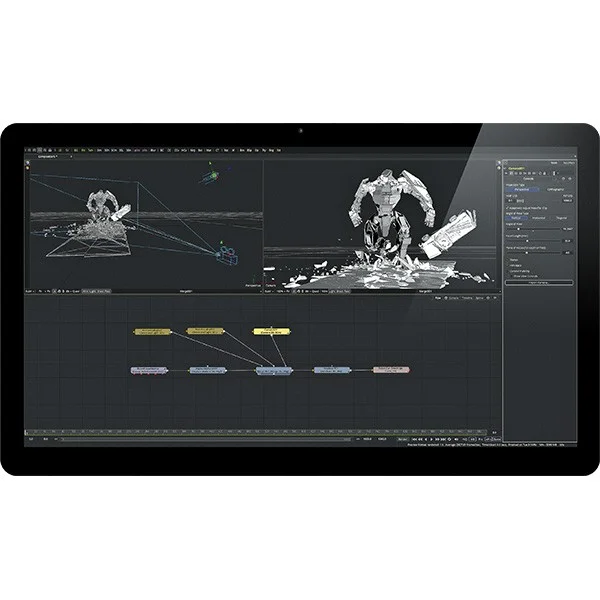
Description
The world’s most advanced solution for creating visual effects and graphic animations!
Fusion is the world’s most advanced compositing software for visual effects creators, broadcast graphic designers, and 3D artists. For over 25 years, Fusion has evolved significantly and has been used in over a thousand Hollywood feature films! Fusion’s ultra-powerful and easy-to-use node-based interface allows you to create complex effects simply by linking different image processing elements togethera very simple and extremely fast solution! You have a wide range of functions and effects at your disposal, enabling you to create broadcast graphics, commercials, spectacular title sequences, and visual effects for feature films!
Fusion 9 Studio includes optical flow image analysis tools for your stereoscopic 3D work, as well as virtual reality tools, clip speed editing, and stabilization. In addition, it supports third-party OpenFX plugins, the native SDK, and the Studio Player application, which features server-side bins to enhance collaboration among multiple users for tracking, managing, correcting, and approving sequences in complex projects. Finally, it offers unlimited network rendering.
[youtube .watch?v=FilWMddizzk?list=PLNa7gkZCrGXpL3E0Jt9bC4biSXo-ZxhcK&w=720&h=405]Over 40 powerful new features
| Virtual Reality | Camera tracking | Planar tracking | Delta Incruster and Clean Plate |
| Fusion is compatible with major virtual reality headsets, it offers real-time viewing for a fully immersive experience, and supports stereoscopic virtual reality. | This feature analyzes the camera movement of live-captured scenes, reproduces that movement in 3D, adjusts the lens’s focal length, and generates a 3D point cloud of the scene. This makes it easy to add computer-generated elements to a moving scene. | This tool tracks areas of an image, automatically retrieves tracking details, and then calculates moving layers that can be used to create four-point effects or to stabilize images. | Achieve clean keying on any background color using the Delta Keyer’s matte control feature, designed to preserve even the smallest details, such as hair. |
|
|
|||
| Planar rotoscoping | Studio Player | New formats | GPU Acceleration |
| The planar rotoscoping feature applies planar tracking data to rotoscoped elements, so that they move correctly and follow the movement and perspective of other objects in the shot. | Studio Player is a new playback engine offering a multi-take timeline, customizable picklists, storyboards, version tracking, annotation tools and much more. | Support for ProRes, DNxHR and MXF for easy transfer of clips between DaVinci Resolve, Fusion and other applications. | In addition to standard GPU acceleration, most Fusion tools now work with OpenCL. This allows them to leverage the GPU’s computing power, making Fusion even faster! |
Used by the biggest Hollywood productions
Thousands of major Hollywood productions and hit television series use Fusion to create breathtaking visual effects. The software has been used on numerous feature films, such as Thor, The Amazing Spider-Man 2, and The Hunger Games, as well as television series like Orphan Black, Breaking Bad, Grimm, Downton Abbey, and the Emmy Award-winning Battlestar Galactica.
More efficient work thanks to knots!
Fusion is based on a node-based structure, where nodes are represented by small icons that symbolize various effects, filters, and other types of image processing. These can be easily connected to create more spectacular and complex visual effects than ever before. Because the nodes are easy to identify and connect, you can combine tools, images, and objects in any order to create an unlimited number of visual effects. Nodes allow you to easily adjust any section of your project by simply clicking on the relevant node. This node-based solution is much faster than timeline-based tools, such as non-linear editing software. Fusion eliminates the need to search through numerous nested layers.
[youtube .watch?v=lM1c9_1yNMI&w=720&h=405]
More features
Whether you want to perform keying, track objects, retouch images, animate titles, or create stunning particle effects, Fusion has an extensive range of tools that allow you to handle jobs involving complex visual effects and motion graphics. You have a 3D workspace and numerous tools for compositing, keying, painting, animation, stereoscopic 3D, and much moreall within a single application!
GPU-accelerated creative workflow
Fusion is an extremely fast visual effects software, especially useful during stressful client meetings. Thanks to its GPU acceleration, you get instant feedback that lets you see exactly what you’re doing. Whether you’re working alone or with a client, Fusion gives you real-time control, allowing you to spend more time creating.
Unlimited rendering power
Fusion features an extremely fast, professional-grade rendering engine! You can share your renders with an unlimited number of networked computers for unparalleled speed! This allows you to render complex scenes very quickly and meet production deadlines without sacrificing creativity or quality.
[youtube .watch?v=-3mjhJn6DJ8&w=720&h=405]
Collaboration within large teams
When working with a large creative team, Fusion 7 Studio also includes Generation, a multi-user management software. Generation is a powerful collaboration tool that lets you manage and retrieve every version of the different shots worked on in your studio. You can assign tasks to creators, take notes, and view each team member’s workload to rebalance the workload and complete projects faster. Fusion 7 Studio also features a bin on the server, allowing everyone to share their work and access the resources needed for a project. This eliminates the need to copy or locate assets on different computers.
True 3D compositing
Combine live scenes with 3D models, cameras, light sources, or other elements in a true 3D space to create stunning and realistic graphic effects and animations.
Extraordinary inlays
Overlay any element using the included Primatte, Ultra, Chroma, Luma, and Differential overlays. This gives you precise control over your mattes, allowing you to create compositions of exceptional quality.
Tracking
Perfectly synchronized integration of objects and effects thanks to the Matchmoving tool, image stabilization and tracking of rotoscoping points or paint strokes.
Vector painting and rotoscoping
Advanced vector painting and rotoscoping tools allow you to create masks and caches to apply effects and image corrections to specific areas of an image.
3D particle systems
Apply animated 3D particle effects subject to terrestrial forces, such as gravity, wind, and impact, so that the particles interact with objects in your scene.
Animated text
High-performance character generators allow you to create animated 2D or 3D text and title sequences in the language of your choice!
3D graphic animations
Create sophisticated motion graphics with unprecedented depth using Fusion’s full 3D space and seamlessly integrate vector graphics, live scenes, and 3D objects!
Importing and rendering 3D models
Import your 3D models into Fusion from applications such as Maya, 3ds Max, and Cinema 4D to add lighting and shadow effects. Fusion also allows for rapid compositing and rendering of your 3D models thanks to GPU acceleration!
Optical flow image analysis
Fusion Studio supports optical flow algorithms that generate motion vectors to correct shots, change image speed, stabilize, and distort images. You’ll get stunning results!
Stereoscopic 3D tools
Fusion Studio incorporates advanced tools for camera harmonization, stereo alignment, convergence, and spatialization, allowing you to create breathtakingly realistic stereoscopic 3D!
An unlimited choice of filters and effects
Fusion includes hundreds of tools that can be combined or associated with third-party filters within Fusion Studio to create an unlimited number of effects!
[youtube .watch?v=mrW3D2GKNEU?list=PLNa7gkZCrGXpL3E0Jt9bC4biSXo-ZxhcK&w=720&h=405]
Deep Pixel Compositing
OpenEXR allows you to take advantage of the RGB channels and XYZ coordinates contained in each pixel to merge 2D images with 3D elements, such as volumetric fog and lights, using interactive controls.
Fusion studio, at the service of VFX
Cutting-edge visual effects compositing
Today, the effects created for Hollywood films consist of hundreds, even thousands, of different 2D and 3D elements composited together to create breathtakingly realistic scenes. Visual effects artists work in true 3D spaces to combine these various elements and create stunningly realistic scenes! Fusion features a node-based workflow and allows you to import 3D models and scenes from other popular applications. It boasts hundreds of tools, effects, and filters to create the most convincing and realistic visual effects!
A true 3D space
Fusion is a comprehensive 3D animation and visual effects compositing application that offers an unlimited 3D space for creating entire scenes. You can render imported 3D models and scenes using FBX or Alembic files, and position them in 3D space alongside virtual cameras and light sources. Fusion also supports point cloud data and native cameras from Maya, 3ds Max, or Lightwave for tracking and reproducing camera movements. Deep Pixel tools allow you to add and modify volumetric fog, lighting, and environment mapping to rendered objects using passes such as World Position Pass (WPP), Z Depth, and normal maps. This allows you to create atmospheric effects that render in seconds!
[youtube .watch?v=hXNP3YAoPe4?list=PLNa7gkZCrGXpL3E0Jt9bC4biSXo-ZxhcK&w=720&h=405]
Nodal workflow
Hollywood’s most renowned visual effects creators require precise control over every element, which is why they work with nodes! Nodes are organized in a tree structure on the screen, allowing you to break down and visualize complex scenes using an easy-to-understand flowchart. Each node represents an image processing step that can be linked to any other node, in any order. Fusion saves you the tedious task of searching through numerous nested layers or pre-composed tracks, so you can always see the image processing at a glance! Thanks to the software’s node-based structure, your decisions are easy to visualize, making it simple to make changes or hand your work off to another creator.
A complete range of inlays and covers
For optimal visual effects compositing, it’s essential to be able to remove blue or green screens to isolate actors and objects. To achieve the desired result, you’ll sometimes need to use various tools to remove unwanted elements. Fusion includes an impressive array of keyers, including the Ultra Keyer, Chroma Keyer, Luma Keyer, Alpha Keyer, and Primatte Keyer! Creating mattes from these keyers, along with the software’s numerous drawing and painting tools, gives you precise control over mattes when working with complex and challenging source material.
Revolutionary 3D particles!
Fusion’s 3D particles are revolutionizing the world of visual effects! These particles allow you to realistically simulate snow, rain, and smoke, as well as physical forces like gravity and rebound that naturally modify your particles. You can even generate social behaviors that mimic the flight of birds or the movements of an ant colony! Of course, the particles are integrated into the 3D space to seamlessly blend into your scene!
Advanced tracking and stabilization tools
Creating realistic compositions often involves perfectly synchronizing the movements of different elements. Fusion lets you automatically track, replicate, and stabilize objects on a plane. Once processed, this tracking data can be converted into editable keyframes, offering extraordinary control! When creating 3D compositions, you can import cameras from Maya or use 3D tracking data generated by third-party applications such as PFTrack, SynthEyes, or Mocha. The movement of any combination of 2D or 3D objects can be tracked using Fusion’s advanced tracking tools!
Vector painting
Whether you’re creating an image from scratch or retouching a shot, Fusion includes advanced, resolution-independent painting tools. You have access to painting tools offering various brush styles, blending modes, and paths that can be modified at any time! The paint tool can also be used to remove cables, equipment, or any other unwanted elements from your image by cloning or painting over them. You can even paint new elements into your scene! Because Fusion’s painting is vector-based, you can return to your project at any time to adjust brush paths, modify the animation path, and change the output size! Whether your final signal is HD or 4K, Fusion’s vector painting will always deliver breathtaking results!
Professional rotoscoping tools
Rotoscoping allows you to isolate actors or objects by drawing and animating shapes on complex planes or when keying isn’t possible. Fusion’s Bezier Spline and B-Spline drawing tools support edge detection, enabling you to precisely outline a subject. You can animate individual points on the curve or use the Transform bounding box to resize, twist, and refine multiple points. You also benefit from the unique « Onion Skin » display, which lets you visualize animation changes on masks, making them easy to modify.
Realistic lighting and shading
To create realistic scenes with 3D environments, you need sophisticated lighting tools. Fusion lets you add an unlimited number of customizable light sources and control how elements react to light in the plane. This allows you to create incredibly detailed 3D environments! Control ambient, directional, and omnidirectional lighting, or cast shadows on 3D shapes using the Spotlight tool! You can also determine how surfaces reflect light, giving your objects a raw, smooth, and glossy appearance, for example, using the Materials and Shaders tools! With Fusion, you can also simulate the reflection and refraction of light on objects using environmental mapping!
Virtual content
Every detail that makes up today’s films is a combination of computer-generated sets and virtual elements, meticulously modeled within a 3D application. When working on this kind of project, Fusion’s innovative tools can save valuable time during the rendering phase. You can create additional 3D content using Fusion’s projection tools, which render in no time without the need for complex 3D shapes! Use projections such as light sources with varying intensity, color, and shading properties. You can also use the Camera Projection tool to replicate textures on cameras while controlling aperture, film type, and clipping.
Volumetric effects
Atmospheric effects such as dense fog or hazy lighting are volumetric effects that can enhance the realism of your shots. This is one of the reasons why Hollywood visual effects are so exceptional! With Fusion, you can dynamically control how volumetric effects affect the rest of the 3D scene and see the results instantly. Adjust fog density, light scattering, and color transmission without wasting time on endless renders! Choose between additive or subtractive blending modes to integrate volumetric effects into the image. Your volumetric effects can also utilize World Position data from Deep Pixel render passes to create realistic fog within the scene, including automatically wrapping elements.
A complete range of stereoscopic tools
When shooting stereoscopic 3D, achieving perfect alignment of the 3D images recorded with the left and right eye cameras can be very challenging. Fusion offers a suite of optical flow tools that go far beyond simple keystone correction and transformations, allowing you to correct complex alignments and misalignments that can occur during production. When creating stereoscopic compositions, Fusion simplifies complex stereoscopic workflows by using a single camera instead of complex stereo equipment. Fusion can even create 3D from a 2D source. In fact, this is the most common solution used by studios to convert 2D films into 3D.
Workflow management and collaboration
When working on larger projects, it can be challenging to distribute tasks, track different versions of a shot, or compile team feedback. Fusion Studio includes Generation, a workflow management application that connects everyone in the studio! It allows producers and supervisors to manage all shots on the project, whether they were shot in Fusion, After Effects, Maya, or Photoshop! You get 4K playback, review and approval tools, version tracking, and a time management solution to keep creators on track. Built-in drawing tools let you communicate changes, then review and compare all versions!
Professional-quality compositing!
Clients producing high-quality feature films, commercials, and television programs demand lifelike results. Fusion incorporates a compositing engine with completely independent resolution and bit depth, ensuring optimal quality for every operation! Fusion’s engine can combine extremely high-resolution images with 32-bit floating-point processing within a consistent, open color space. Furthermore, the Region of Interest and Domain of Definition settings optimize processing to prevent unnecessary rendering!
[youtube .watch?v=dQ6JbU3y73o?list=PLNa7gkZCrGXpL3E0Jt9bC4biSXo-ZxhcK&w=720&h=405]
Macros, Expressions and Scripting
Fusion’s built-in macro tool allows studios and creators to build and share their own tools with other creators by combining nodes and choosing which controls to display. You can create links between simple parameters or add more advanced expressions that control the relationships between multiple parameters using a single slider. For consistency across large studios and workflow automation, Fusion and Generation are programmable using Python and Lua, enabling you to automate tasks for your entire studio.
OpenEXR Workflow
The OpenEXR files integrated into Fusion’s node-based structure allow for the efficient management of multiple 3D rendering passes from 3D applications. A single EXR file can represent several passes, including Diffuse, Specular, Normal, World Position, and many more! Because each pass can have its own branch in the hierarchy, creators have complete control over each one without the need for duplication!
Color management
When multiple creators are working across different systems, maintaining color consistency is essential. Fusion’s advanced color management tools make it easy to harmonize colors, profile, and manage shots from multiple cameras. Support for Open Color I/O and the new ACES color standard lets you work in a linear color space that’s consistent and compatible with any creator, wherever you are!
Unlimited network rendering
Fusion will never limit your productivity! That’s because Fusion Studio includes unlimited network rendering for free. You can install the Fusion rendering engine on as many workstations as you like and manage it using the included renderer or third-party renderers such as Smedge, Spider, and Rush. Network rendering can be used to quickly send the final project or to improve the speed of previews while you work!
[youtube .watch?v=IjCWQnsS6ZM?list=PLNa7gkZCrGXpL3E0Jt9bC4biSXo-ZxhcK&w=720&h=405]Graphic animation
Broadcast design and graphic animation
Graphic animators and broadcast designers use Fusion for a wide range of creations, including television channel logos, title sequences, feature film animations, television series, and commercials. With Fusion, you’re not limited to working with only 2D elements, as you can import 3D objects and scenes from other applications or create your own designs from scratch! Fusion allows you to composite elements in true 3D space and apply hundreds of built-in effects as well as 3D particles!
A true 3D space
Creating motion graphics in a 3D environment adds realism and a sense of space to your projects! Fusion’s 3D workspace supports cameras, light sources, and 3D objects from Maya, Cinema 4D, 3ds Max, and many more! You can also create 3D objects from scratch within Fusion! Create zigzag animation paths through fog and around light sources in 3D space. Fusion does all this using GPU acceleration to create a highly interactive creative space.
3D particles based on physical laws
Fusion’s 3D particle system lets you create stunning particle effects that shimmer and swirl. You can add earth forces like gravity and bounce that naturally influence and modify your particles. Particles support 3D geometry, can change color, and even emit other particles! Furthermore, because particles are embedded in 3D space, they can border, bounce off, and swirl around other elements in your scene! Fusion’s 3D space and particle system allow you to create sequences impossible to achieve in 2D applications!
[youtube .watch?v=7orr7DKvGZs?list=PLNa7gkZCrGXpL3E0Jt9bC4biSXo-ZxhcK&w=720&h=405]
Easy-to-create inlays
Broadcast graphic designers need a wide range of tools to overcome the challenges of post-production for green and blue screen shoots. That’s why Fusion integrates Primatte, Ultra, Luma, Chroma, and Alpha keyers for creating mattes. You also have access to Bezier Spline and B-Spline rotoscoping tools and their unique « Onion Skin » display, which allows you to intuitively visualize how your masks animate over time. With Fusion, you’ll achieve flawless keying every time and consistently deliver stunning compositions!
Creating stunning 2D and 3D titles
Create stunning animated titles using advanced 2D and 3D text tools! You have all the traditional formatting controls such as size, font, kerning, and alignment, as well as international language support for right-, left-, and vertical text display. Extrude 3D text, add reflections or embossing, cast shadows, and overlay video onto your text! Animating individual characters is incredibly intuitive thanks to the unique Follower tool! Make your text fly, spread a glow across the letters, or float extruded 3D text in your scene!
3D logo animation
Add animated logos to your commercials and title sequences for a spectacular effect! Import and render 3D logos from Cinema 4D, 3ds Max, or Maya and animate them using Fusion’s 3D tool palette! You can apply materials, adjust depth of field, and even bend, refine, and twist embossed logos for true 3D animation! Fusion also lets you import and animate 2D vector files (SVG), which can be exported from popular applications like Illustrator, CorelDRAW, and Inkscape.
[youtube .watch?v=wE47H9l98WA?list=PLNa7gkZCrGXpL3E0Jt9bC4biSXo-ZxhcK&w=720&h=405]
Built-in vector painting tool
Fusion’s painting tool is an extremely flexible vector tool that lets you create animated ornaments, clone images, or create entirely new images from scratch! Change brush types, colors, textures, and modify the brush’s effect on the image. Brush strokes can be transformed into editable curves, allowing you to change their shape, length, and size over time! For even finer control, use a graphics tablet to adjust the opacity and size of a stroke as you paint!
Realistic surface lighting
Fusion’s 3D workspace goes far beyond simply placing 3D objects and adding cameras! You can create incredibly detailed scenes using realistic light sources and adjust various lighting optionsambient, directional, and omnidirectionalto create the perfect atmosphere. The Spotlight feature lets you cast shadows on 3D shapes. Fusion allows you to choose how light affects objects using Textures, Materials, and Shaders! Furthermore, you can change the effect of a 3D object to give it a rough, smooth, or glossy appearance!
Importing Photoshop files
Import your Adobe Photoshop graphics into Fusion to create motion graphics. Fusion can handle the entire image created in Photoshop, whether it’s a single layer or every layer! Layers created with Photoshop are automatically converted into nodes, making animation design easy. Even Photoshop’s blending modes are preserved by Fusion! Individual layers can be modified using tools and animations built into Fusion’s 3D workspace. Fusion finally offers Photoshop users a solution for animating their graphics within a true 3D environment!
Instant copying of 3D patterns
Bringing a project to the screen sometimes requires the use of specific tools that make your work easier and inspire you! The Replicate 3D tool lets you automatically copy 3D elements to create replicas of objects that will fit into any shape. This tool supports 3D shapes created in Fusion as well as models imported from other 3D software, such as Maya, 3ds Max, and Cinema 4D. Create spectacular ripples by simply modifying the animation parameters of the replicated objects. Random controls will give your rendering a more natural effect. Indeed, you can apply subtle variations to your ripple, including modifying the parameters of the ripple’s center, amplitude, rotation, and even speed. Thanks to the Replicate tool, it is now possible to create 3D graphic elements that would be impossible to achieve otherwise.
Spline-controlled keyframes
When you need to animate elements in your project, Fusion offers a wide range of commands for ultra-precise control! The incredibly flexible Curve Editor uses intuitive Spline curves to produce smooth effects between keyframes. Various interpolation methods are employed, including Linear, Bezier, and B-Spline curves, allowing you to customize keyframe curves to loop, reverse, and ping-pong, creating sophisticated animations. You can also move, stretch, and group keyframes using the Transform bounding box to quickly create amazing motion effects!
External OpenFX Plugins
To unleash their creativity, Fusion Studio users can expand their toolkit by integrating the best OpenFX plugins. Use plugins from industry leaders like GenArts, RE;Vision Effects, and BorisFX to get the latest elements and most popular effects!
Connecting Fusion to the Avid Timeline
Editors working with Avid Media Composer can now use Fusion’s compositing and animation tools! Simply add Fusion’s Connection effect to any clip or group of clips in the timeline and then open Fusion directly within Media Composer without needing to export your footage. Fusion will automatically create a composition of all the clips and layers represented in the node structure. Once the project is complete, it’s simply sent back to Media Composer. The Connection effect gives editors instant access to Fusion’s powerful 3D compositing and animation tools, right within the Media Composer timeline.
Creating unique effects
The Macro tool offers a simple and practical solution for independent artists and large studios to create and share their own tools! Combine and group the tools you need to create macros with a single click! To ensure consistency within your studio, select which parameters you want to show and which you want to hide! For example, you can design a unique keyer with numerous keying effects, cache cleanup tools, and even links and expressions that you can adjust with a slider!
Advanced scriptwriting
Save time by automating complex actions with programming languages! Scripting within Fusion can be done using Lua or Python. You can create a document containing a list of names that generates text on a Fusion project, or create control folders that instantly add images to designated compositions. You can even start rendering while the folder is updating. Scripting language support in Fusion and Fusion Studio offers endless possibilities!
Accelerate your 3D animation workflow
3D animators working with applications like Maya, 3ds Max, and Cinema 4D can improve the efficiency and speed of their compositing workflow! Fusion is built on a node-based interface and includes GPU acceleration tools that allow you to relight and add volumetric lights to your 3D scenes without rendering each time! Fusion’s numerous image processing tools, such as color correction, blur effects, and other plugins, give you complete control over the final rendering of your shots, saving you valuable time.
3D space with unlimited possibilities
This comprehensive and powerful 3D compositing solution lets you spend less time recreating work done in other software, such as Maya and 3ds Max, and more time working on your project! Fusion allows you to import cameras, load scenes in FBX format, or use the Alembic format for animated shapes. Fusion’s incredible 3D workspace offers limitless options and integrates OpenGL acceleration, enabling you to interactively edit millions of polygons, volumetric atmospheric effects, and 3D particle systems without waiting! You can preview instantly, and renders are completed in seconds!
An easy-to-use node-based interface
Fusion software is based on a node-based structure well-known to 3D artists! This structure provides a schematic representation of all the elements in the composition, making it easy to visualize image processing and composition. This tree-like representation offers an excellent way to visualize the complex technical constructions of compositing from multi-pass renders. Using a series of connected nodes in a tree diagram facilitates changes and interventions by other artists! The ongoing image processing is never hidden by pre-composed or nested layers in the timeline.
[youtube .watch?v=_fxbiyRgWGA?list=PLNa7gkZCrGXpL3E0Jt9bC4biSXo-ZxhcK&w=720&h=405]
Deep Pixel compositing tools
You can now apply 3D volumetric effects to your 2D rendered images using Deep Pixel data saved in OpenEXR files. Compositing with Deep Pixel data preserves the coordinates of 3D scenes within the rendered 2D images. This is because pixels contain not only the RGB and alpha channel information, but also the XYZ coordinates of each pixel. Fusion allows you to render complex compositions and effects, such as 3D volumetric effects like fog and lighting. Complex scenes are rendered in seconds, unlike other 3D software!
Realistic lighting and shadows
Import


